Run signed off
Night clean marked complete for Harbour Tower · Level 3.
Any site
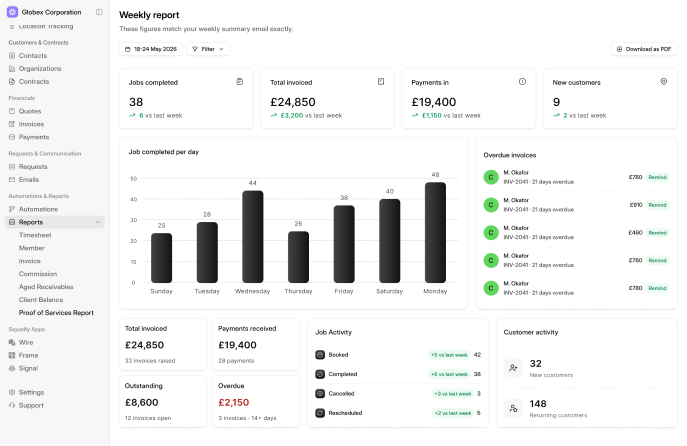
The photo gets chased when a clean is missing proof. The report drafts itself at month end. The certificate is flagged before it expires. Nobody has to remember, and nobody has to chase.
— Event
The crew marks the job done in Frame or MySquadly. That completion is the trigger for billing.
— Detect
Customer, site, scope, tasks, and work on the portal forwards automatically. Nothing manual. No re-entry.
— Trigger
A draft invoice is built from the completed work so charges match what was delivered.
— Input
Nexus posts the invoice into the right Wire channel for approval. One tap to approve, then it goes to the customer.
— Less errors
No skipped steps. No forgotten updates. Automation reduces rework and missed follow-ups.
— Setup once
Your process keeps running without extra input. Based on the data already in Frame.
— No training
The right updates land in the right place. Fewer mistakes and less chasing without handovers or new habits.
— Always in the background
It keeps workflows moving while your team is on-site, even after hours.
— Better customer service
Customers get confirmations, reminders, and status updates automatically. Faster responses build trust.
— Lower admin burden
Less time typing notes, sending emails, and chasing approvals. It's desk work removed.
An urgent clean comes in. Nexus books the crew in Frame and sends the confirmation. No skipped steps, no forgotten updates.
Nexus reads Frame data as the trigger source and writes back to Frame when actions complete: jobs, invoices, customer records.
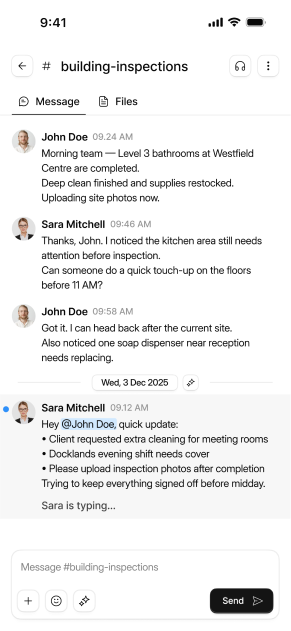
Approval requests, shift alerts, and team notifications land in the right Wire channels, not a generic notifications inbox.
Xero, QuickBooks, and email integrations. Nexus can trigger actions across your accounting and communication tools.
When Signal launches, inbound calls will become Frame jobs, and Nexus will handle the confirmations & scheduling automatically from that point.
Book 20 minutes. Contractors see proof and client reports.Owners see visibility over every contractor.
Site channels, photos and approvals.Free for the whole team.